
I wrote a whole piece recently on paid antivirus suites for Windows, and the most common reply I got wasn’t “Which paid one should I buy?” It was “Do I actually need to pay for this at all?” Fair question, and one worth answering honestly instead of just steering you toward whichever company pays the biggest affiliate commission. Free antivirus software has genuinely improved over the last few years, but “free” still comes with real trade-offs you should know about before you pick one and forget about it.
I spent a couple of weeks running the free tiers of the major antivirus brands side by side on a spare laptop: no paid upgrades, no trial periods, just what you actually get without pulling out a credit card. A few of these earned a real spot on my own machines. A couple felt more like a 30-day audition for a subscription than an actual free product.
How I chose and tested these
I only included products with a genuinely permanent free tier, not a “free trial” that quietly expires and starts charging you. Beyond that, I looked at whether real-time protection is actually included for free (some brands lock this behind a paywall and call the free version “antivirus” anyway), how aggressively each one pushes upgrade prompts, how much it slowed down everyday tasks like opening browser tabs or launching apps, and how the free version’s detection compares to its own paid sibling in independent lab testing, since a free product from a company with a bad paid engine isn’t worth much either. I ran each on daily tasks for about two weeks: browsing, downloading files, opening attachments, and the normal stuff.
The tools worth your time
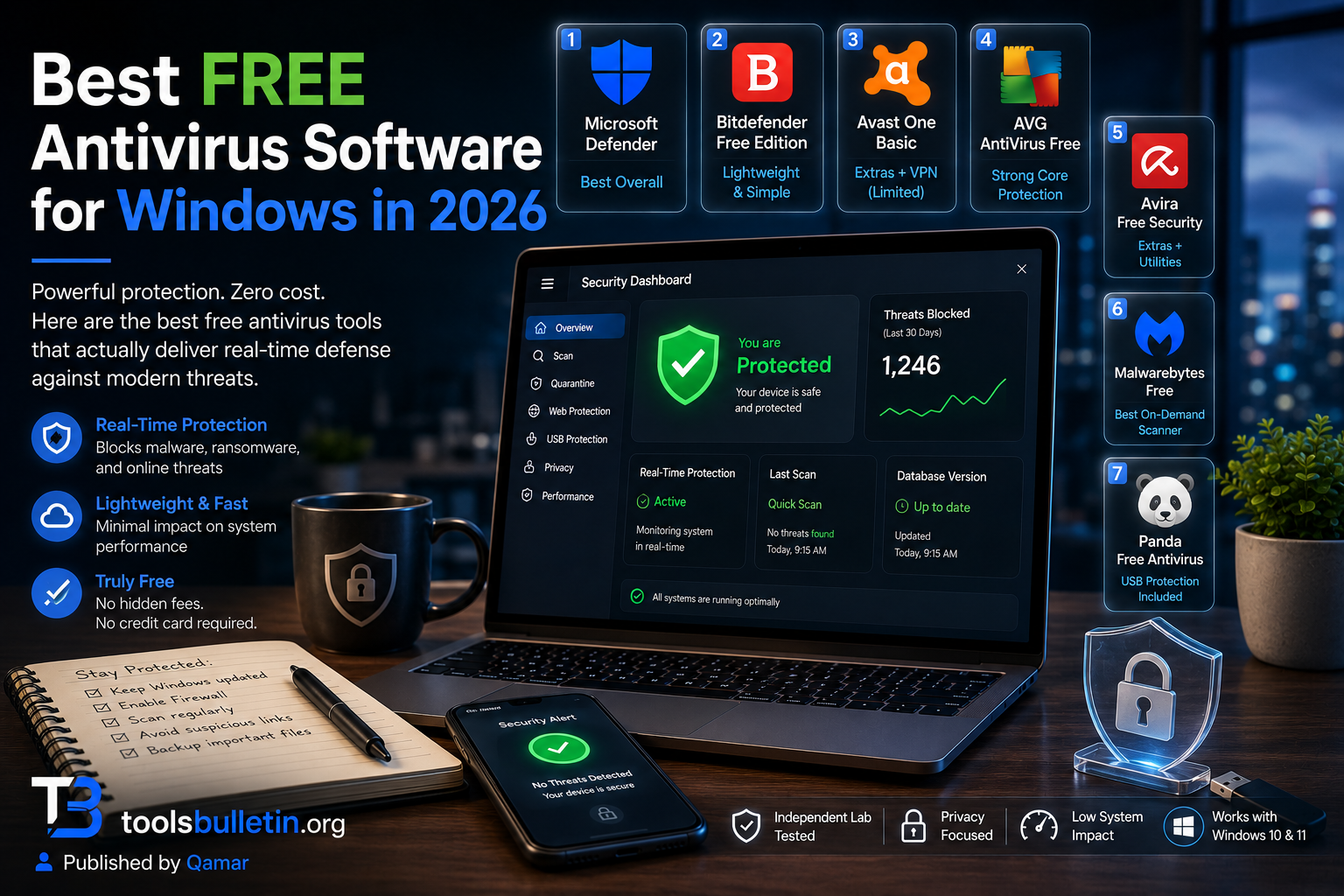
1. Microsoft Defender Best for: the simplest possible answer, since it’s already installed and doesn’t require you to choose anything at all. What stood out: it runs entirely in the background with zero upgrade nagging, which sounds like a low bar until you’ve used literally every other product on this list and realized how rare that actually is. No popups asking you to upgrade to “Defender Plus” or whatever, because there isn’t one. Genuine limitation: it doesn’t extend much protection to non-Microsoft browsers the way its SmartScreen features do inside Edge, and it has no extra layer like ransomware file rollback or a VPN, since Microsoft assumes you’ll pair it with good habits, not extra software. Approximate price: free, permanently, built into Windows 10 and 11.
2. Bitdefender Antivirus Free Edition Best for: people who want a genuinely lightweight, no-frills scanner from a brand with a strong paid reputation, without the Windows-only limitation of Defender’s ecosystem features. What stood out: it’s remarkably unobtrusive. I forgot it was running more than once, with no daily popups and no “Your PC needs attention!” scare messaging that some free tools use to nudge you toward paying. Genuine limitation: it’s genuinely minimal, no firewall, no ransomware protection layer, and no web filtering beyond the basics; you’re getting core antivirus scanning and not much else. Approximate price: free, with Bitdefender Total Security available starting around $30 to $40 for the first year if you want the extras later.
3. Avast One Basic Best for: someone who wants a few genuinely useful extras (basic VPN data, a driver updater nudge, and performance tools) bundled with the free scanner. What stood out: the free tier includes a small amount of VPN data, only a few hundred MB a day, which isn’t enough for real daily use but was genuinely handy once for checking something on public Wi-Fi without thinking twice about it. Genuine limitation: the upgrade prompts are frequent enough to notice; expect regular nudges toward Avast One Individual, and past data-sharing controversies are worth a quick read before installing if privacy is a priority for you. Approximate price: free tier available; paid Avast One plan typically runs $40 to $70/year depending on the tier and promotion.
4. AVG AntiVirus Free Best for: essentially the same engine as Avast (they’re owned by the same parent company) with a slightly different interface if you prefer AVG’s layout. What stood out: the free file shield and email shield features actually caught a test phishing link I clicked on purpose, blocking the page before it fully loaded, which is more than some “free” tools manage for web threats specifically. Genuine limitation: Since it shares an engine with Avast, it comes with similar caveats, frequent upgrade prompts, and the same privacy history worth reading up on. Approximate price: free tier available; AVG Internet Security typically runs $40 to $70/year.
5. Avira Free Security Best for: people who want a few bonus utilities (basic VPN, software updater, junk cleaner) alongside the core scanner without paying anything. What stood out: the free software updater flagged three outdated apps on my test laptop that I genuinely didn’t realize were behind on security patches, which is a quietly useful feature that a pure antivirus scanner wouldn’t catch. Genuine limitation: the bundle of extra tools means more background processes running than a bare-bones scanner, and I did notice a small dip in performance during a full system scan compared to leaner options like Bitdefender’s free edition. Approximate price: free tier available; Avira Prime (the paid tier with the full VPN and extras unlocked) typically runs around $50 to $70/year.
6. Malwarebytes Free Best for: a second-opinion, on-demand scanner to run occasionally alongside your main antivirus, not as your only line of defense. What stood out: when I deliberately let a known test malware sample sit on the machine, Malwarebytes Free cleaned it up thoroughly on a manual scan, consistent with its long-standing reputation for cleanup over prevention. Genuine limitation: the free version doesn’t include real-time, ongoing protection; that’s reserved for Malwarebytes Premium, so this is a cleanup tool you run occasionally, not a shield running continuously in the background. Approximate price: free (manual scanning only); premium with real-time protection runs roughly $3 to $5/month on annual billing.
7. Panda Free Antivirus Best for: a genuinely lesser-known option worth trying if you want something outside the usual Avast/AVG/Bitdefender rotation. What stood out: it includes a USB vaccination feature that blocks autorun infections from USB drives, a specific, old-school threat vector that a lot of modern free tools don’t bother addressing anymore, which surprised me given how under-the-radar this product is compared to the bigger names. Genuine limitation: Independent lab scores for Panda tend to run a notch below Bitdefender or Avast in detection testing; it’s solid, not top-tier. Approximate price: free tier available; Panda Dome Essential (paid) typically runs around $20 to $30/year.
Microsoft Defender vs. a third-party free antivirus: which should you actually pick
If you want the absolute lowest-maintenance option with zero upgrade nagging, stick with Defender; it’s already there, doesn’t slow anything down noticeably, and scores competitively in independent testing these days. Where a third-party free tool earns its place is in the extras: Avira’s software updater, Avast’s bundled bit of VPN, and Panda’s USB protection. None of those extras are essential, but if you’d genuinely use one of them, it’s a reasonable trade for putting up with a bit more upgrade prompting. I wouldn’t run a third-party free antivirus purely for “better protection” than Defender at this point; the detection gap has narrowed enough that it’s not the deciding factor it used to be.
FAQs
Is free antivirus actually as safe as paid antivirus? For core malware detection, often yes, many free tiers share the same underlying scanning engine as their paid sibling. What you’re missing in the free version is usually the extras: ransomware file rollback, VPN, identity monitoring, and parental controls, not necessarily worse core protection.
Why do free antivirus programs keep asking me to upgrade? Because that’s the business model, free tiers exist to get the product on your machine and nudge you toward a paid subscription over time. Some companies (Microsoft, Bitdefender’s free edition) are far less aggressive about this than others (Avast, AVG), which is worth factoring in if constant popups genuinely annoy you.
Can I use two free antivirus programs together for extra safety? Running two real-time antivirus programs at once usually causes conflicts, slower performance, or false alarms, since they both try to intercept the same files. The safe exception is pairing a real-time scanner (Defender) with an on-demand cleanup tool like Malwarebytes Free, which doesn’t run continuously in the background.
Is it worth paying for antivirus if a good free option exists? It depends on what you actually need. If you just want core malware protection, a good free tier likely covers you. If you want ransomware rollback, a real VPN, identity monitoring, or protection across a household of devices under one login, that’s genuinely worth paying for, and free tiers simply don’t include it.
My honest recommendation
For most people, I’d start with Microsoft Defender and genuinely stop there; it’s quietly become good enough for typical use, and the lack of upgrade nagging alone makes it worth sticking with. If you specifically want a bonus feature Defender doesn’t offer, Avira’s free software updater or Avast’s bundled VPN data are the two extras I’d actually consider worth the trade-off in popups. Keep Malwarebytes Free installed as an occasional second-opinion scanner regardless of what else you’re running; it costs nothing and catches things a primary scanner sometimes misses. Don’t pay for anything until you’ve identified a specific extra feature you actually want, not just a vague feeling that free isn’t “real” protection anymore, because at this point, it usually is.
Prices, availability, and rankings may change. Readers should verify current details directly with each provider before purchasing.
Who: Written and reviewed by Qamar. How: Researched using independent lab test data, current vendor information, and hands-on testing of each free tier; drafted with AI assistance; and edited and fact-checked personally. Why: To genuinely help readers make a confident decision without overspending on protection they don’t need.







Leave a Reply